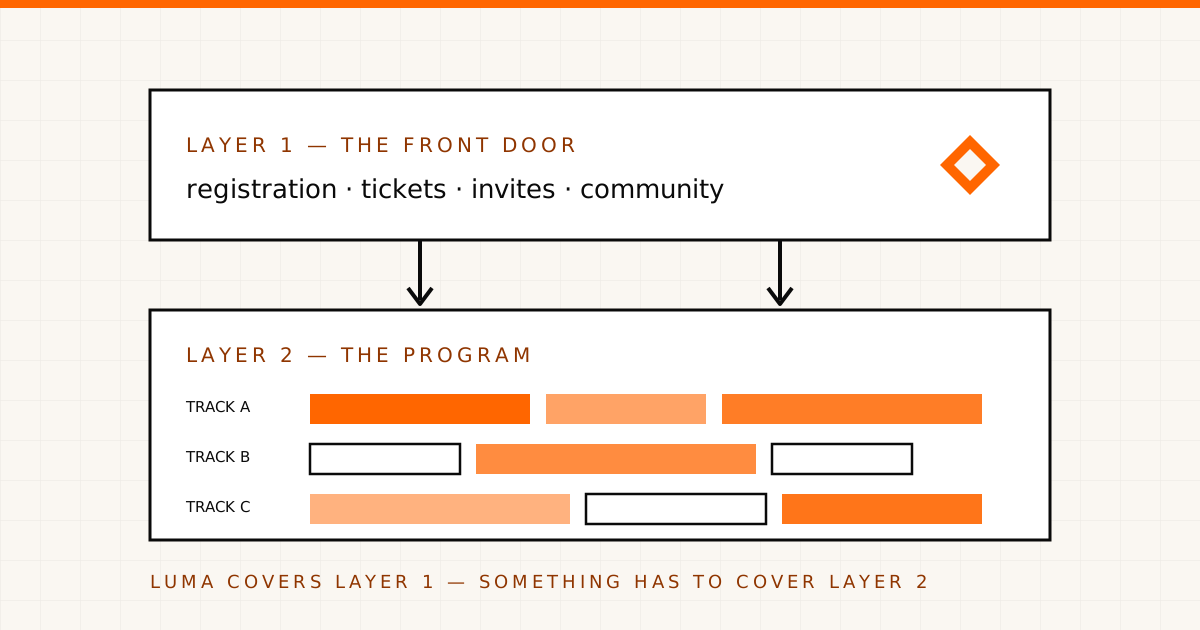
Luma is one of the best front doors an event can have: a beautiful event page, painless registration, invites and blasts people actually open, and a community calendar your attendees already follow. What it is not — and doesn’t claim to be — is conference software. There is no concept of a track, a session, a speaker, a sponsor, or a call for papers anywhere in the product. If you’re taking a community that lives on Luma and growing it into a multi-track conference, you’re not choosing whether to add another layer. You’re only choosing which one.
Here’s an honest map of the boundary, and the ways organizers handle it.
What Luma genuinely covers
Registration and ticketing, the event page, approval-based guest lists, email blasts, and the social/discovery loop — people following your calendar find your next event without you doing anything. For meetups and single-room events, that’s the whole job, which is why the answer to “what tool should I use” for those events is usually just “Luma.” Its API (available on Luma’s paid plan) covers exactly this territory too: guests, tickets, ticket types, and webhooks for registrations — and Luma even documents patterns for connecting external check-in systems, so the attendee layer is genuinely open to being built on.
Where it stops
The content layer. Concretely, when your event becomes a conference you start needing things Luma has no object for:
- A multi-track agenda. Tracks, sessions, rooms, and time slots — with some defense against double-booking a speaker or a room.
- A CFP. A submission form, a review process, and a way for acceptances to become program without re-keying.
- Speaker operations. Bios, headshots, AV needs, travel details, tasks with deadlines — a speaker CRM, not a guest list entry.
- Sponsor tracking. Deliverables, logos, contacts, and who promised what to whom.
- A public agenda page attendees can actually navigate by track and time.
None of this is a hidden weakness — Luma’s API surface simply contains no sessions, agenda, speakers, sponsors, or CFP endpoints. The product is scoped to attendees, and it’s excellent at that scope.
How organizers actually fill the gap
The spreadsheet-and-Notion stack. Agenda in a spreadsheet, speaker details in Notion, CFP in a form tool, the final schedule pasted into the Luma event description or a linked doc. It works for one track and one edition; it degrades exactly the way the ten-tool stack always does — the seams eat your week, and next year starts from zero.
A CFP point tool plus a schedule site. Sessionize or similar for submissions and agenda display, linked from the Luma page. Genuinely fine for community events (Sessionize is free for genuinely free ones), but speakers, sponsors, and attendees now live in three unconnected systems, and speaker logistics still happen in your inbox.
A content-layer platform beside Luma. Keep Luma as the front door — registration, community, discovery — and run the conference’s inside on a system built for it: CFP, review, speaker portals, sponsor records, and the agenda in one pipeline, with a public agenda link on the Luma page. More capable than the point-tool stack, one more real product to run.
A sane two-layer setup
If your audience lives on Luma, don’t fight that — the community calendar is an asset you can’t export. The setup that works: Luma owns attendees (registration, tickets, blasts, discovery), one system owns the program (submissions → review → speakers → agenda), and the Luma event page links to the public agenda. The discipline that makes it work is refusing to let program data live in more than one place — the moment the agenda exists in both a spreadsheet and a schedule tool, you’re back to reconciling versions at midnight.
The honest part
AgendaForge is that second layer — the CFP-to-agenda pipeline, speaker portals, sponsor records, and an AI-assisted agenda builder that flags room and speaker clashes while you schedule, with speakers, sponsors, submitters, and registrants in one directory. Three things we won’t pretend: we don’t have a native Luma integration today, so pairing the two means running them side by side rather than syncing them; we’re invite-only while we onboard early partners; and while we do include our own registration (custom forms, ticket types, free RSVPs), paid ticketing isn’t generally available — so if Luma is selling your tickets, keep Luma selling your tickets.
If your Luma community is about to become a real conference, the boundary above is the whole decision: keep the front door you have, and pick the content layer deliberately instead of letting a spreadsheet volunteer for the job.