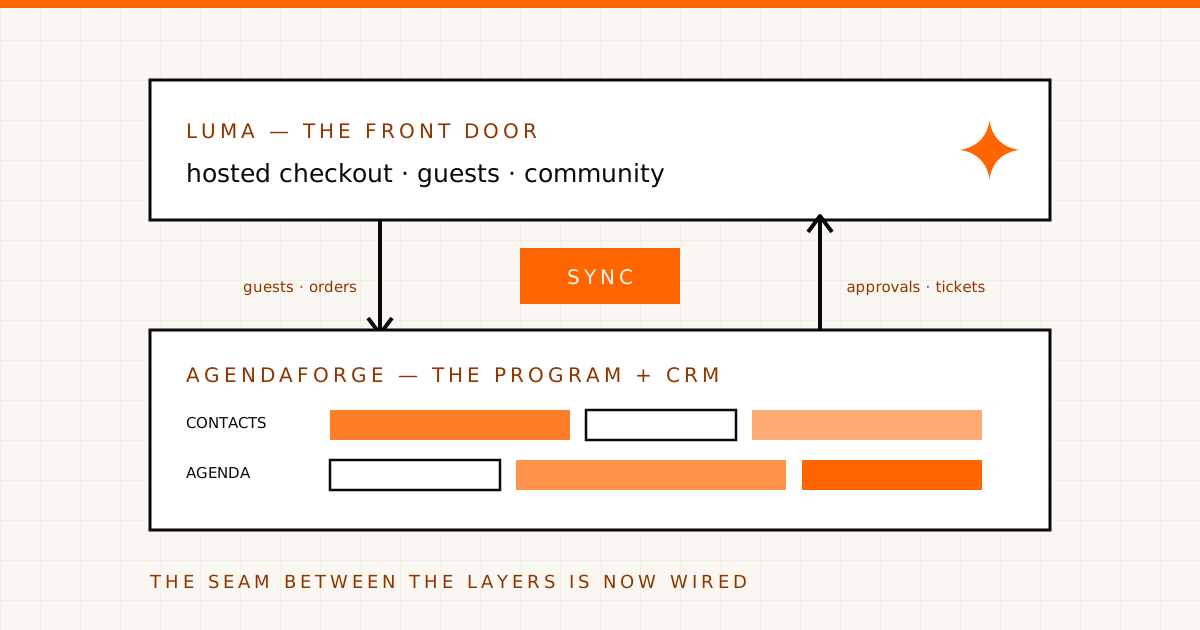
Two weeks ago we published an honest map of running a multi-track conference on Luma: Luma is a great front door — registration, tickets, community, discovery — with no concept of tracks, sessions, speakers, or a CFP. Our recommended setup was two layers: Luma owns the attendees, one system owns the program, and the seam between them stays manual. In that post we said, plainly, that we didn’t have a native Luma integration.
That line is now out of date. AgendaForge connects to Luma directly.
What the sync does
Connect one Luma calendar with its API key, bind your AgendaForge event to an event on that calendar, and the attendee layer wires itself together:
| Direction | What happens | |
|---|---|---|
| Guests & orders | Luma → AgendaForge | Full backfill on connect, then live signed webhooks. Every guest becomes a contact + event member with tags, notes, segments, and email. |
| Guest management | AgendaForge → Luma | Approve, decline, waitlist, set pending, or invite guests by email — written back through Luma’s API. |
| Ticket types | Both ways | Create or edit a ticket type in AgendaForge (price, capacity, sale window, approval) and it pushes to Luma; Luma-side types sync in. |
| Check-ins | Luma → AgendaForge | Scans happen in Luma; the checked-in state mirrors into your CRM’s attendance view. |
| Money | Stays on Luma | Buyers pay on Luma’s hosted checkout and funds settle to your own Stripe. Full refund management stays in Luma; a decline action in AgendaForge can optionally ask Luma to refund that guest. |
The sync is built to never drift: Luma stays the source of truth for the registration record, and when a webhook arrives AgendaForge re-fetches the full guest rather than trusting the payload. Full details are on the Luma integration page.
Why we kept the money on Luma
Deliberate choice, not a limitation we’re hiding. If your community already lives on Luma, the checkout is part of what your attendees trust — and Luma’s API physically can’t charge a card from outside anyway. So AgendaForge doesn’t wrap, reskin, or intercept the buying experience: Luma sells the ticket, the payment settles to your Stripe, and we take no fee on Luma sales. What we own is everything around the sale — the CRM your guests land in and the program they’re coming to see.
If you want a fully branded, in-app checkout instead, our native Stripe rail is built for that, and a single event can switch between the two rails without losing its order history. Native Stripe ticketing is currently early access behind a feature gate while we complete end-to-end production validation with a launch partner, so confirm access with us before planning a paid launch on it.
What this changes for the two-layer setup
The two-layer recommendation stands — Luma owns attendees, AgendaForge owns the program. What’s gone is the seam you had to manage by hand. Registrants no longer wait for a CSV export to become people you can work with: they’re contacts the moment they register, next to your speakers, sponsors, and submitters. And because registrants become contacts, our Google Sheets sync now gives Luma events a live spreadsheet, no Zapier in between.
For the day-to-day of working that guest list from the CRM — segmentation, approvals, invites — we’ve written a separate hands-on guide.
The honest requirements
- Luma Plus, on Luma’s side. Luma gates API keys and webhooks to Plus, so a free Luma account can’t be connected. We validate the key when you paste it and tell you plainly if it doesn’t have API access.
- Pro plan, on ours. The Luma integration ships as part of ticketing, which is a Pro-plan feature — $4,000 per event, published like everything else.
- One connected Luma calendar per organization, currently. Luma API keys are scoped to one calendar, and AgendaForge stores one active Luma calendar connection for the organization.
- Check-in is a mirror. Luma’s check-in API is read-only; scanning stays in Luma.
- One rail per event. An event runs on Luma or on native Stripe ticketing, not both at once — though you can switch, and history is kept.
- We don’t push your agenda into Luma. Luma’s API has no content-layer endpoints (that hasn’t changed), so the program lives in AgendaForge and you link the public agenda from your Luma page.
If your Luma community is becoming a real conference, this is the stack we built for that moment: keep the front door your attendees already trust, and run everything behind it in one system. We’re invite-only while we onboard early partners — tell us about your event and we’ll bring you in.